
A successful Salesforce data migration ensures a smooth transition, seamless data mobility, and reliable analytics to support informed decision-making. By establishing secure, transparent, and structured data, organizations can retain customers and drive growth in today's competitive digital landscape.
Salesforce Data Migration: Challenges and Best Practices
- July 30, 2024
- 7 min read
What is Salesforce Data Migration?
Salesforce is a leading cloud-based CRM platform designed to centralize customer information, streamline business processes, and generate actionable customer insights. Salesforce data migration involves transferring customer records—including profiles, transaction histories, accounts, leads, and custom object data—from legacy systems, spreadsheets, or existing databases into the Salesforce environment. According to the IDC Worldwide Semiannual Software Tracker (2022), Salesforce held a leading 18.7% share of the global CRM market. Our specialized Salesforce consulting services help organizations navigate complex data transitions seamlessly.
Reasons for Data Migration
Multiple operational and technological drivers prompt businesses to transition from legacy data sources or legacy CRMs to Salesforce:
- Outgrown capacity of existing systems: As your business scales and customer volume grows, legacy databases or CRMs often fail to deliver the speed, reliability, and capacity needed. Migrating to Salesforce solves performance bottlenecks.
- Cost optimization: Salesforce offers flexible licensing options, allowing organizations to pay for the exact features and clouds they need while eliminating expensive legacy maintenance costs.
- Elimination of infrastructure overhead: As a fully managed cloud platform, Salesforce eliminates server maintenance and hosting complexities, enabling internal teams to focus on data insights and business strategy.
- Flexibility and scalability: Organizations can easily customize and expand Salesforce features as operational demands evolve, minimizing downtime and accelerating time-to-value.
Salesforce Data Migration Process
- Outline the data model: Define data types, source architectures, and target object structures based on business requirements. Our CRM consulting experts assist in aligning source schemas with Salesforce standard and custom objects.
- Data selection: Identify essential historical and operational data to migrate. Filter out legacy clutter to ensure only relevant, clean data is transferred.
- Data cleansing: Scrub, standardize, and deduplicate records before loading to eliminate formatting inconsistencies and incomplete fields.
- Data migration execution: Utilize appropriate Salesforce tools (such as Data Loader or Salesforce Import Wizard) to execute mapped bulk data loads.
- Data validation: Perform post-migration reconciliation and sample testing to verify data accuracy, field mappings, and relationship integrity.
Data Import Technical Considerations
Importing data accurately is critical to maintaining operational efficiency and customer trust. According to Salesforce FY2022 Financial Reports, Salesforce generated over $26.49 billion in revenue, driven by enterprise reliance on clean CRM data pipelines. Consider these technical guidelines during migration:
- Checkboxes: Use boolean values (`1` for TRUE, `0` for FALSE) to ensure checkbox fields map accurately during import.
- Date/Time & Formula fields: Align date formats with target Salesforce locale settings (ISO 8601). Note that formula fields are read-only and automatically generated, so they cannot accept imported data.
- Validation rules & automation: Temporarily deactivate custom validation rules, triggers, and workflow rules during bulk migration to prevent import errors and execution timeouts.
- Default values: Set default values for required fields in the import wizard to prevent failures when source records contain empty attributes.
- Multi-select picklists: Separate multiple picklist values with semicolons (`;`) in your source files to ensure correct multi-value mapping.
Common Challenges and Mitigation Strategies
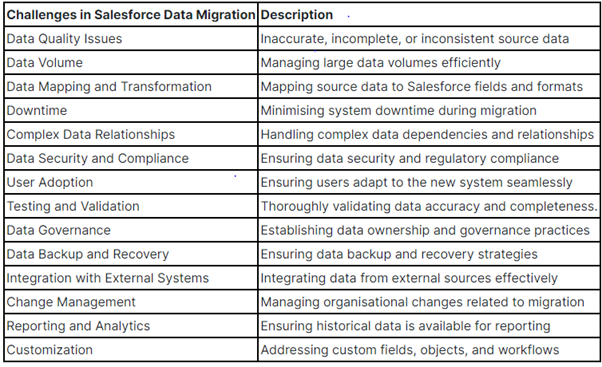
Enterprise migrations present specific operational and technical hurdles that require structured mitigation strategies:
- User adoption: Shifting staff from legacy workflows to a modern CRM requires structured onboarding and role-based training.
- Data quality & customer impact: Inaccurate or misaligned customer records can lead to erroneous analytics and poor customer communications.
- Analytics gaps: Incomplete historical data or duplicated records impair report generation and business decision-making.
- Lack of planning: Insufficient scope definition and unmapped dependencies lead to project delays and cost overruns.
- Schema complexity: Complex object relationships and triggers must be thoroughly evaluated before field mapping.
- Upstream/Downstream dependencies: Understanding how source data interacts with external systems ensures related records remain synchronized post-migration.
- Data volume: Large volumes dictate whether to use API-based tools, bulk API loading, or specialized middleware.
- Field mapping accuracy: Diverse customer datasets require strict field-level mapping to maintain semantic meaning.
- Complex relational integrity: Preserving parent-child relationships (e.g., Accounts to Contacts or Opportunities) requires ordered batch loading.
- Security and compliance: Ensuring data privacy (GDPR, HIPAA, SOC 2) during transit and storage is mandatory.
- Testing and validation: Extensive pilot testing in sandbox environments verifies security rules and workflow triggers prior to production load.
- Backup and recovery: Maintaining full source backups ensures rapid rollback options in case of unexpected execution failures.
- External system integration: Planning API endpoints and middleware ensures smooth interoperability with external software ecosystems.
- Change management: Active leadership guidance and transparent communication minimize user resistance and accelerate adoption.
Best Practices for a Smooth Migration
Implementing these established industry practices ensures a seamless Salesforce data migration:
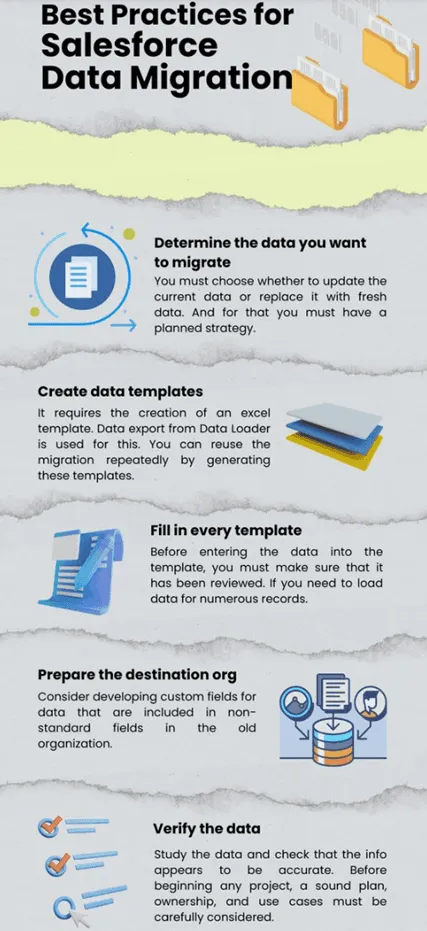
- Establish clear business objectives: Define target outcomes, key performance indicators, and specific data requirements before initiating technical work.
- Identify and prioritize datasets: Filter legacy data to migrate high-priority, high-quality records while archiving outdated information.
- Create robust data templates: Standardize CSV import templates matching target Salesforce object schemas to eliminate field mismatches.
- Develop a phased migration timeline: Plan migration iterations, allocation of resources, sandbox dry-runs, and go-live windows in advance.
- Enforce data governance policies: Define clear data ownership, access controls, and security roles across internal migration teams.
- Secure comprehensive backups: Maintain verifiable full backups of legacy databases prior to starting migration runs.
- Organize and profile source data: Cleanse data upstream to remove duplicate records and maintain database health. According to Salesforce Investor Financial Guidance, robust enterprise adoption continues to drive strong double-digit growth.
- Prepare the target Salesforce environment: Build required custom fields, page layouts, record types, and custom objects prior to data loading.
- Conduct sandbox testing: Run trial migrations in a Salesforce Sandbox environment using sample datasets to identify and fix errors early.
- Select the right migration tools: Utilize the Salesforce Import Wizard for smaller datasets (up to 50,000 records) or Salesforce Data Loader / enterprise ETL tools (e.g., Jitterbit, MuleSoft) for larger volumes (up to 5 million+ records).
Conclusion
Salesforce data migration is a critical milestone in modernizing business operations and unlocking full CRM capabilities. While technical and organizational challenges exist, following structured data mapping, cleansing, and validation practices ensures a smooth, risk-free transition.
Choosing the right approach to Salesforce data migration protects your customer data and sets your CRM up for long-term success. NIRA Systems has helped organizations execute secure, accurate Salesforce migrations — see how we helped organizations achieve 99% data accuracy across 8+ Salesforce implementations. Ready to plan your migration? Contact our team today.
Developed by:
NIRA Systems - Collaboration Meets Innovation